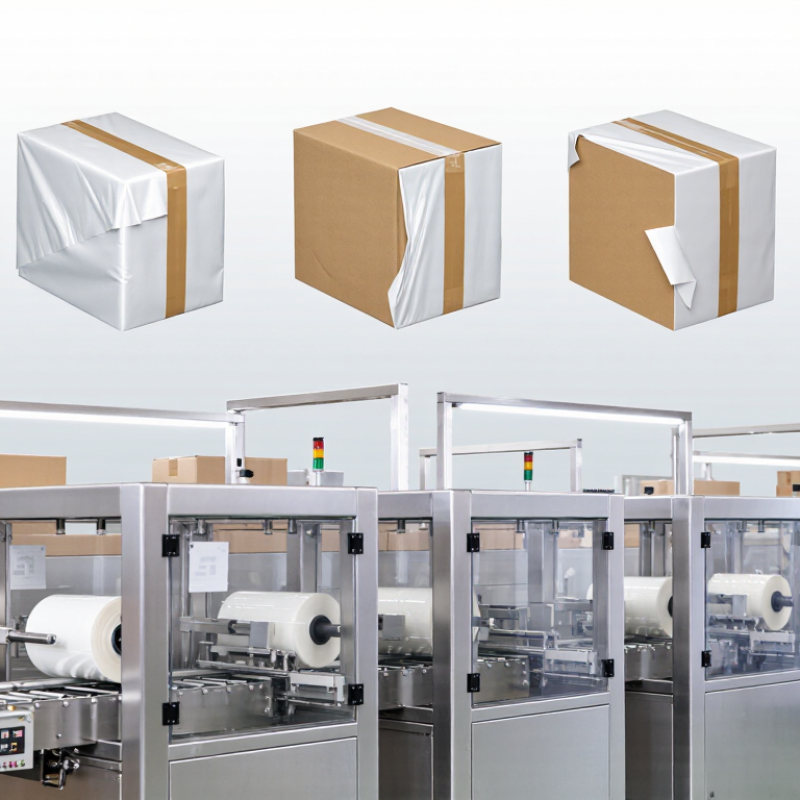
| 1 |
Incorrect sealing temperature |
The center seals, but the two corners remain open or peel apart. |
The film has not reached its effective sealing range, especially where several layers overlap. |
Check the actual sealing-bar temperature with a calibrated surface thermometer and compare it with the film supplier’s specification. |
Adjust temperature gradually. Avoid increasing heat excessively, because overheated film can shrink away from the corner or burn through. |
High |
| 2 |
Insufficient sealing pressure |
A thin, discontinuous seal appears at the corner, with visible air gaps. |
The sealing blade, silicone pad, or pneumatic system does not apply uniform contact pressure. |
Inspect pneumatic pressure, blade alignment, cylinder movement, and the condition of the silicone or PTFE-covered contact surface. |
Restore the machine’s specified air pressure, align the blade, and replace worn or hardened contact pads. |
High |
| 3 |
Sealing-bar misalignment |
One corner seals while the opposite corner has a gap or an uneven seal width. |
The upper and lower blades are not parallel, so the corner receives less heat or pressure. |
Place a clean sheet of paper at several points along the blade and check whether resistance is consistent during closing. |
Level and center the sealing bars. Tighten loose mounting hardware and confirm equal contact across the full sealing length. |
High |
| 4 |
Excess film at the corner |
The corner forms a thick folded lump that is only partly fused. |
Too many film layers overlap in one location, exceeding the available heat and pressure transfer. |
Open the package and count the folded layers around the corner. Look for pleats, loose tails, or incorrect film width. |
Use the correct film width, reduce excess slack, and position the product so the film overlaps within the sealing area. |
Medium |
| 5 |
Film contamination or moisture |
The seal looks cloudy, dirty, greasy, or separates when lightly pulled. |
Dust, oil, product residue, or water prevents the film surfaces from making direct contact. |
Inspect the film path, sealing blade, product surface, and work area for residue or condensation. |
Clean the sealing area with an appropriate non-abrasive method, dry the product, and keep film rolls protected from humidity and dust. |
Medium |
| 6 |
Excessive sealing speed |
The straight section seals intermittently, while corners are consistently weak. |
The dwell time is too short for heat to pass through the overlapping film layers. |
Reduce the sealing speed or increase dwell time for a controlled test while keeping temperature unchanged. |
Lower cycle speed until the seal becomes continuous, then fine-tune temperature and pressure without making large simultaneous changes. |
Medium |
| 7 |
Worn or damaged sealing wire |
A small unsealed notch, burn mark, or irregular line occurs repeatedly in the same position. |
A distorted wire, damaged coating, or loose connection creates a cold spot or uneven heat distribution. |
Disconnect power and inspect the wire, insulation cloth, spring tension, terminals, and contact surface. |
Replace damaged consumables with the correct size and tension. Do not operate the machine with exposed or frayed heating wire. |
High |
| 8 |
Film not suitable for the sealing process |
The seal is weak across the entire package, especially at multilayer corners. |
The film’s sealing layer, thickness, or shrink characteristics do not match the machine’s operating conditions. |
Verify film type, thickness, sealing-layer compatibility, roll storage condition, and the machine’s approved film range. |
Run a controlled test with compatible film. Store film in a dry, temperature-stable area and follow the material supplier’s limits. |
Medium |
| 9 |
Product positioned too close to the seal |
The corner seal is pushed outward, wrinkled, or blocked by the product edge. |
The product or its sharp edge interferes with complete blade closure and prevents a flat film overlap. |
Check product centering, clearance from the sealing line, and whether the package shape changes during sealing. |
Adjust the product position, use suitable film dimensions, and protect sharp edges with corner guards or smooth packaging material when necessary. |
Medium |
| 10 |
Uneven film tension or tracking |
One side of the package is tight while the opposite corner has wrinkles or an open flap. |
The film roll, guide rollers, or dancer system is not centered, causing diagonal tension during sealing. |
Observe film travel, check roll alignment, inspect guide rollers, and measure whether the film feeds evenly from both sides. |
Center the film roll, clean or level guide rollers, remove telescoping rolls, and set consistent film tension before changing heat settings. |
Medium |
 Jinye Machinery